
ED PELAEZ
AI Automation Specialist
I turn repetitive tasks into autonomous systems — so you can focus on what matters.
12+
Automations Built
50+
Hours Saved Weekly
7+
Clients Served
PROJECTS
Automations I built that save time, cut costs, and scale operations.
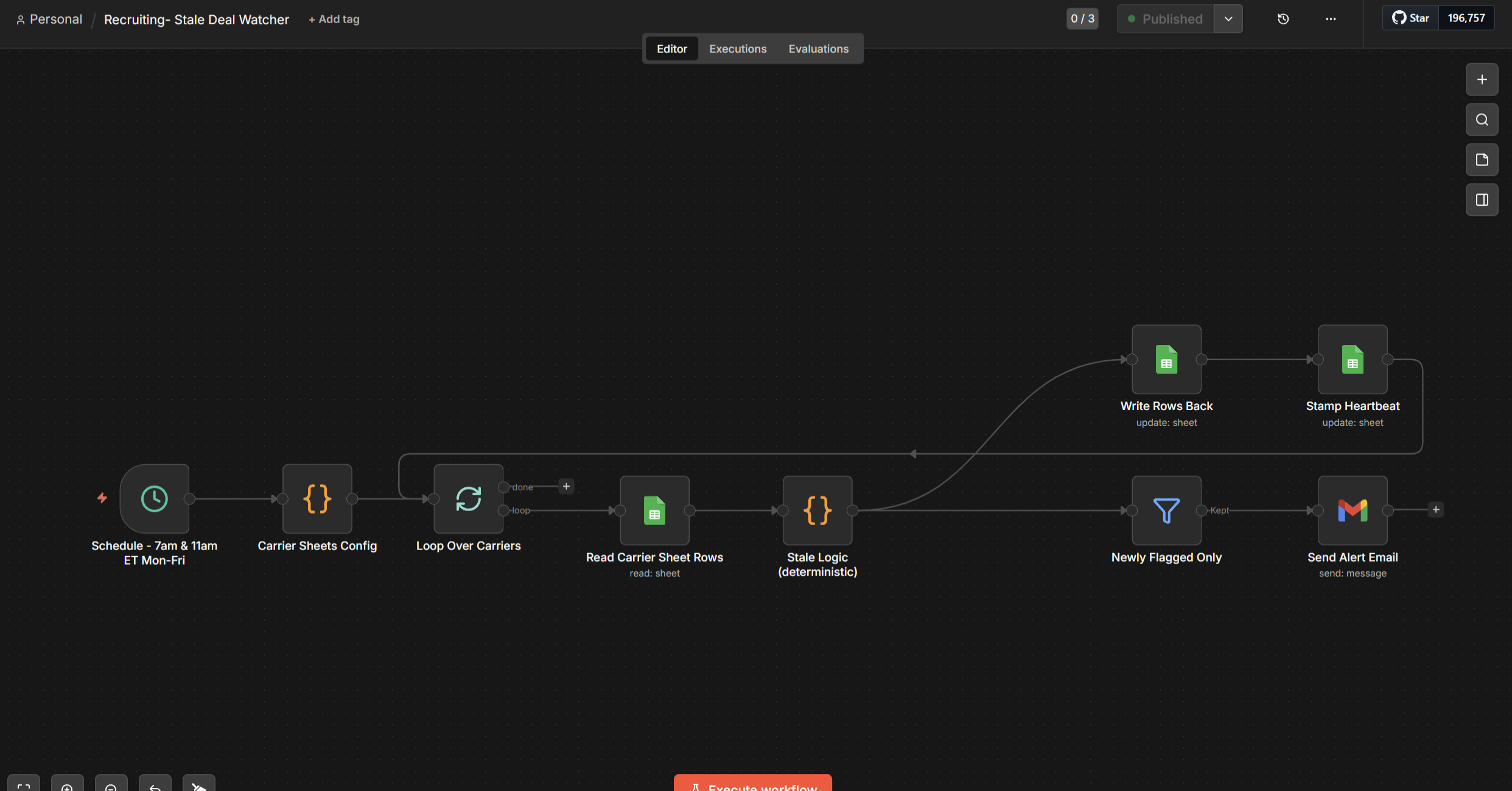
Recruiting Agency — Stale File Watcher
A deterministic n8n workflow that watches a driver-recruiting agency's Google Sheets hiring trackers and flags any file that's gone quiet, so account managers never have to manually scan a sheet to find what needs attention. No AI anywhere in the loop — a spreadsheet script stamps the moment a file is actually worked, and a twice-daily scheduled check does the rest. Built and validated end-to-end with a live test.
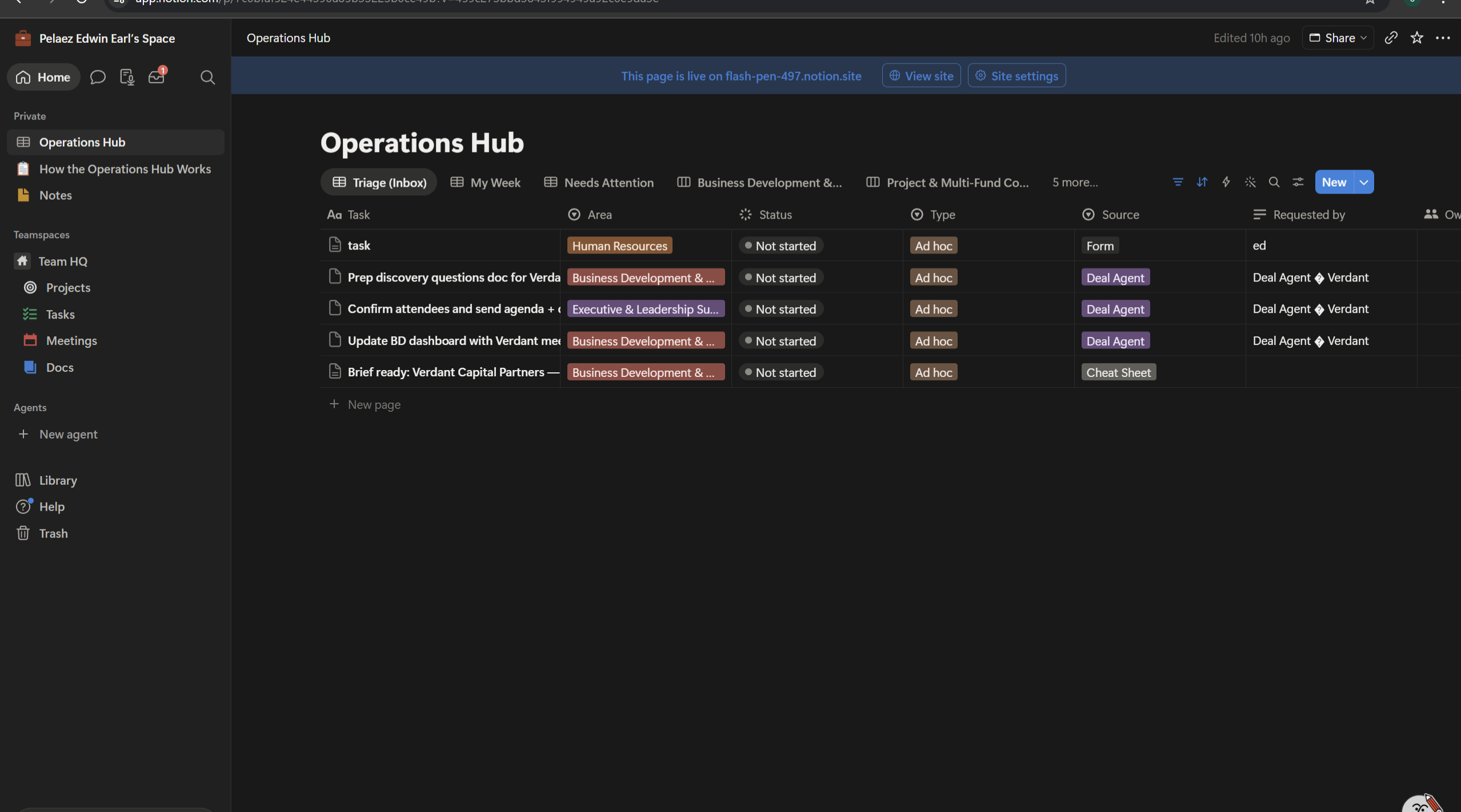
Climate Advisory — Operations Hub
Seven connected n8n workflows that run an ops coordinator role for a global climate advisory firm — requests flow in through a form, deal stage changes auto-spawn task playbooks in Notion, a nightly scan flags overdue and stale tasks with direct comments, a meeting-booked trigger fires a 12-step research agent that delivers a formatted brief before every sales call, and a daily lost-deal agent scans the CRM, judges re-engagement with AI, and emails the owner Approve/Skip. Built and presented live to the Co-Founder & COO in under five hours.
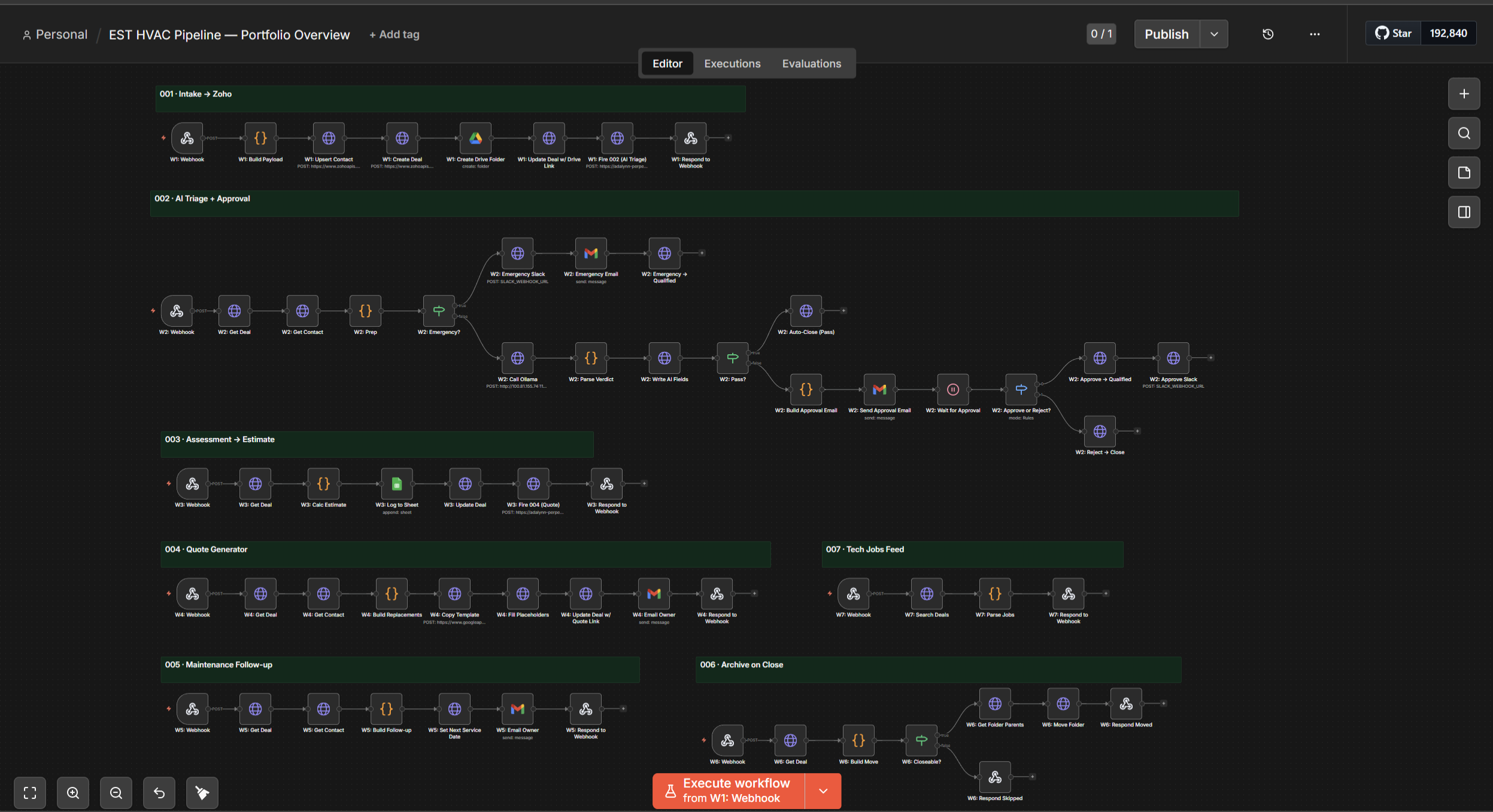
EST HVAC — AI Sales Pipeline
Seven connected n8n workflows that run an air-conditioning business from booking to invoice — lead intake with city-based technician routing, local AI lead screening, one-click owner approval, an on-site estimate app that prices jobs live, auto-generated quotes filed to the client's folder, and automatic maintenance follow-ups. Humans approve the two decisions that matter; automation handles the rest.
Climate Advisory — Operations Hub
Book for a live demoSeven connected n8n workflows that run an ops coordinator role for a global climate advisory firm — requests flow in through a form, deal stage changes auto-spawn task playbooks in Notion, a nightly scan flags overdue and stale tasks with direct comments, a meeting-booked trigger fires a 12-step research agent that delivers a formatted brief before every sales call, and a daily lost-deal agent scans the CRM, judges re-engagement with AI, and emails the owner Approve/Skip. Built and presented live to the Co-Founder & COO in under five hours.
How It Works — Step by Step
1 · Request comes in
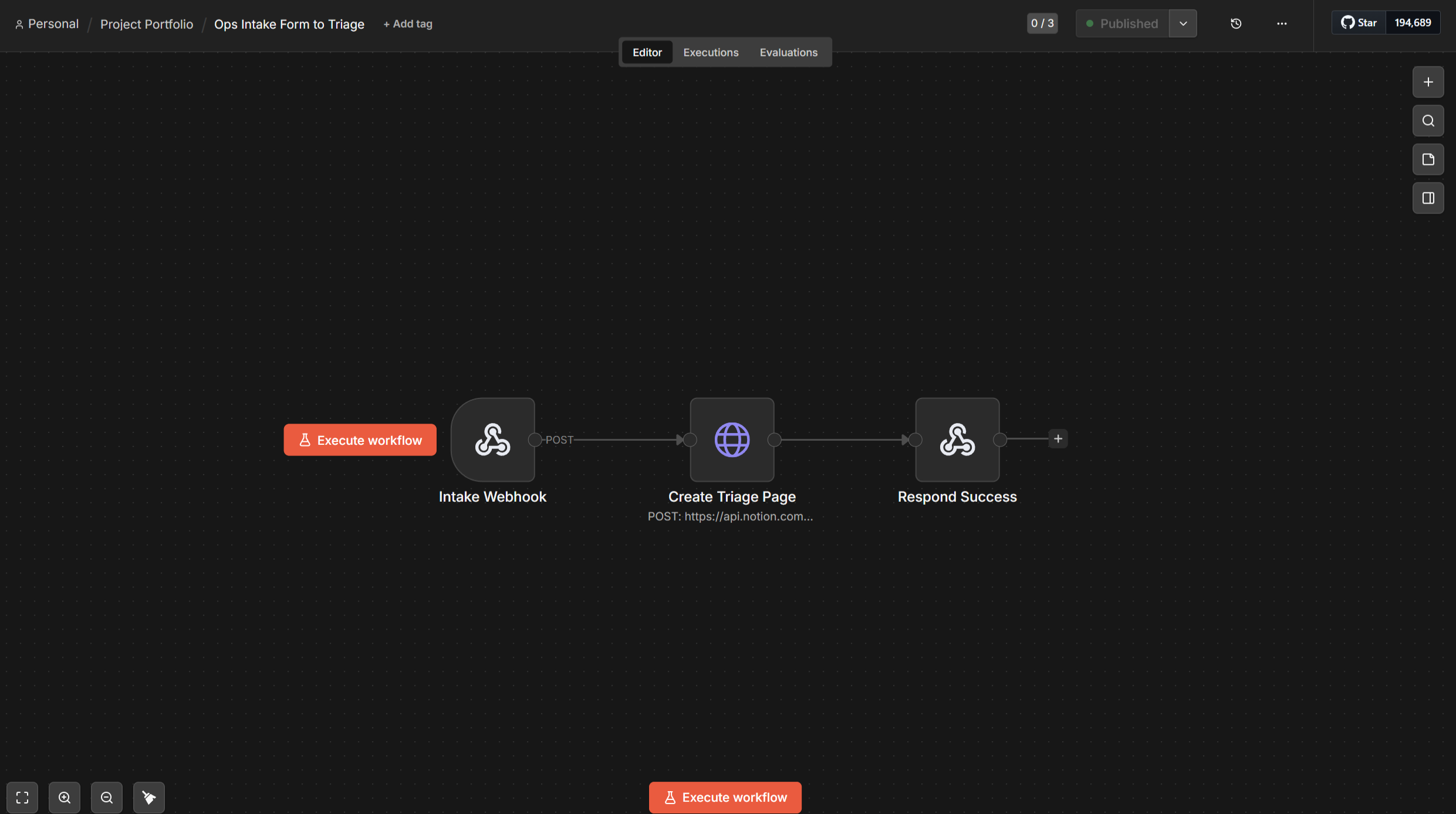
A team member submits a request through a simple form. In under 3 seconds, a task is created in the Operations Hub — categorised by area, typed as ad hoc or recurring, source tagged as Form. No inbox, no Slack thread, no memory required.
2 · Deal moves → tasks appear
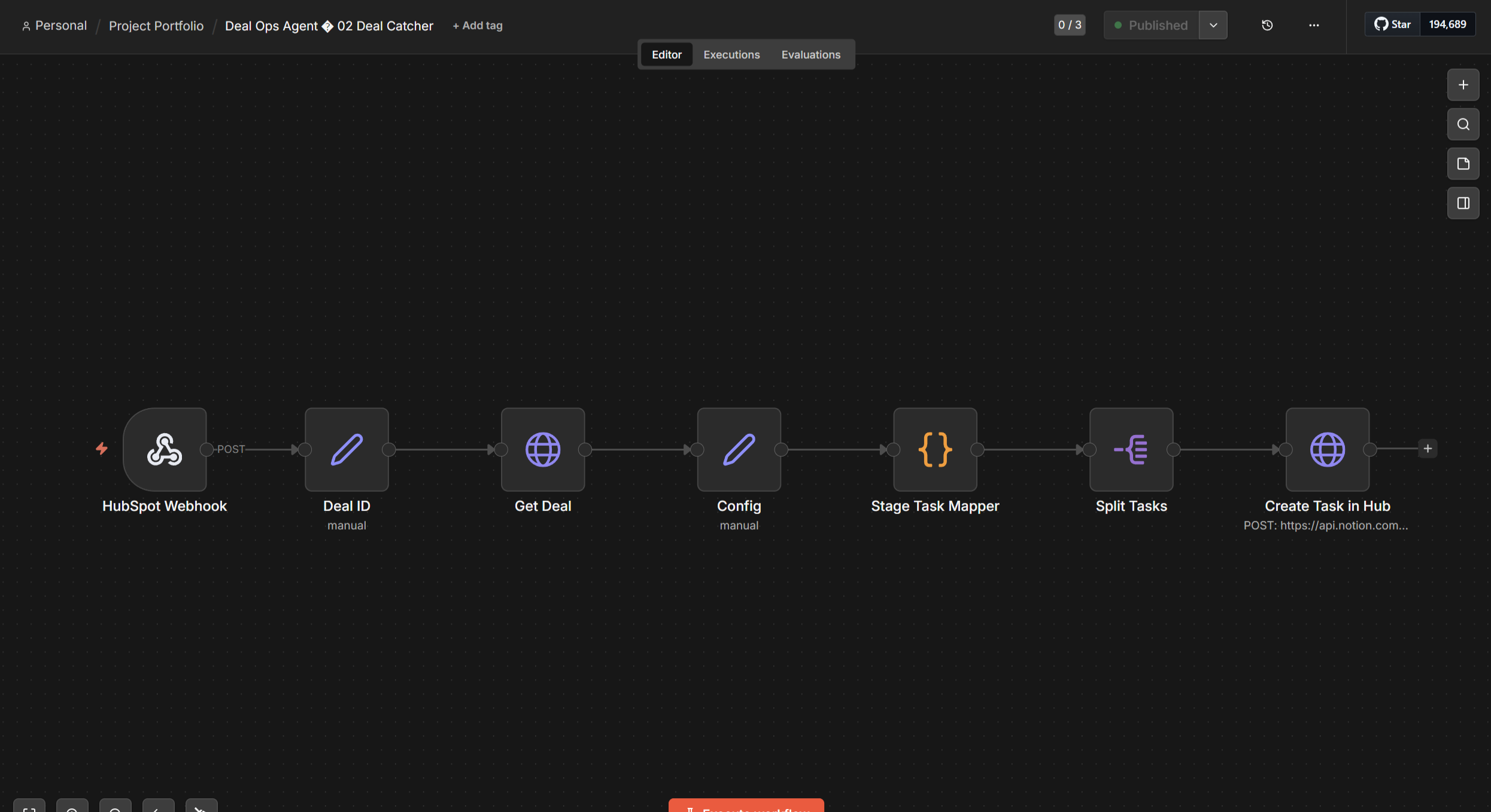
The moment a deal advances in HubSpot, the Deal Catcher fires. It reads the current pipeline stage, maps it to a task playbook, and creates every relevant task in Notion with due dates pre-set. Moving a deal to Discovery Done spawns five tasks in seconds — call summary, stakeholder mapping, multi-fund flag, compliance check, scope definition.
3 · Night Watch runs every morning
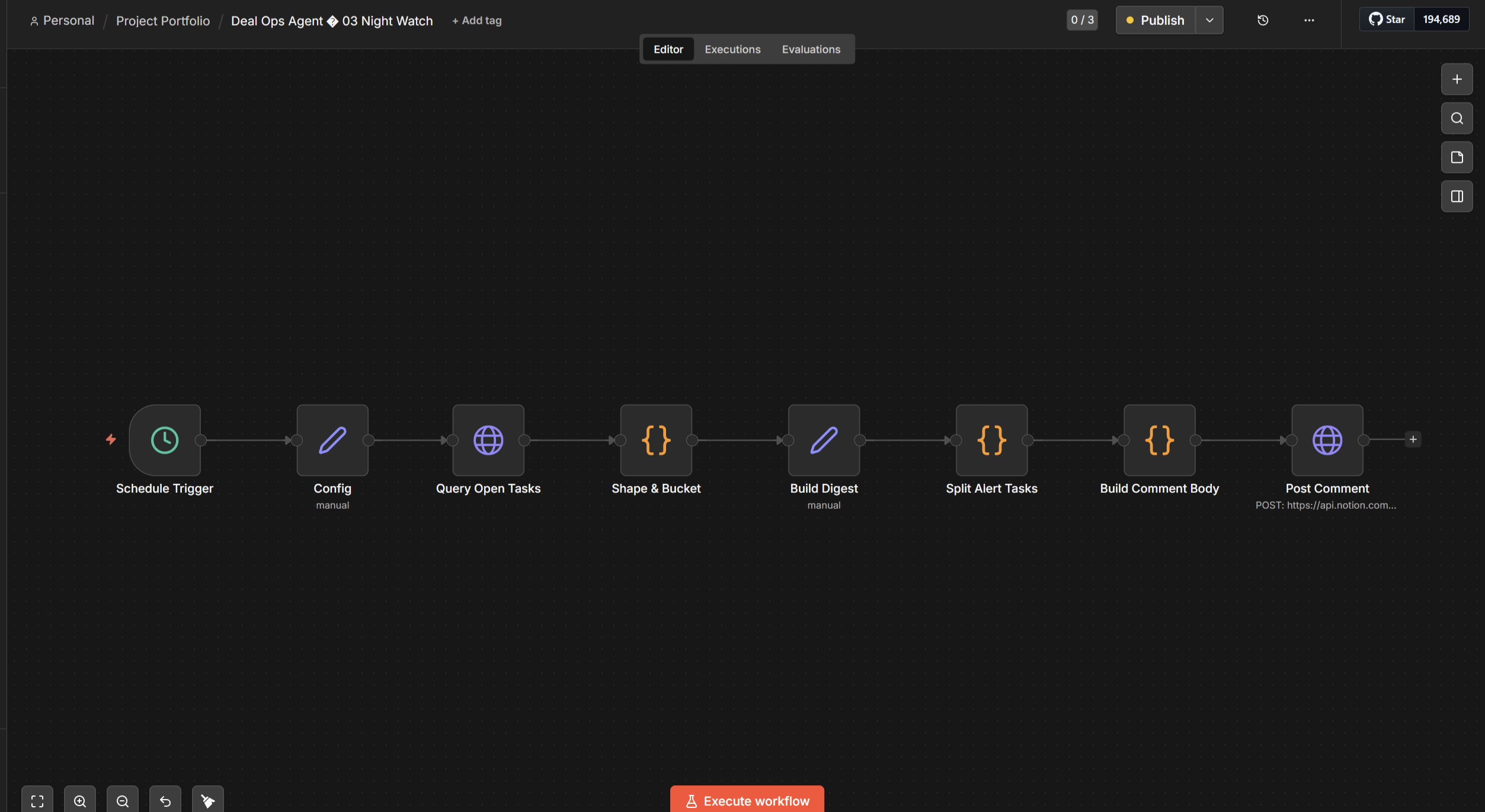
Every morning, Night Watch scans all open tasks. Tasks due today or overdue get a red alert comment tagging the owner. Tasks with no due date untouched for 3+ days get a stale flag. Nothing slips without a trace — and the coordinator didn't have to check.
4 · Meeting booked → brief ready
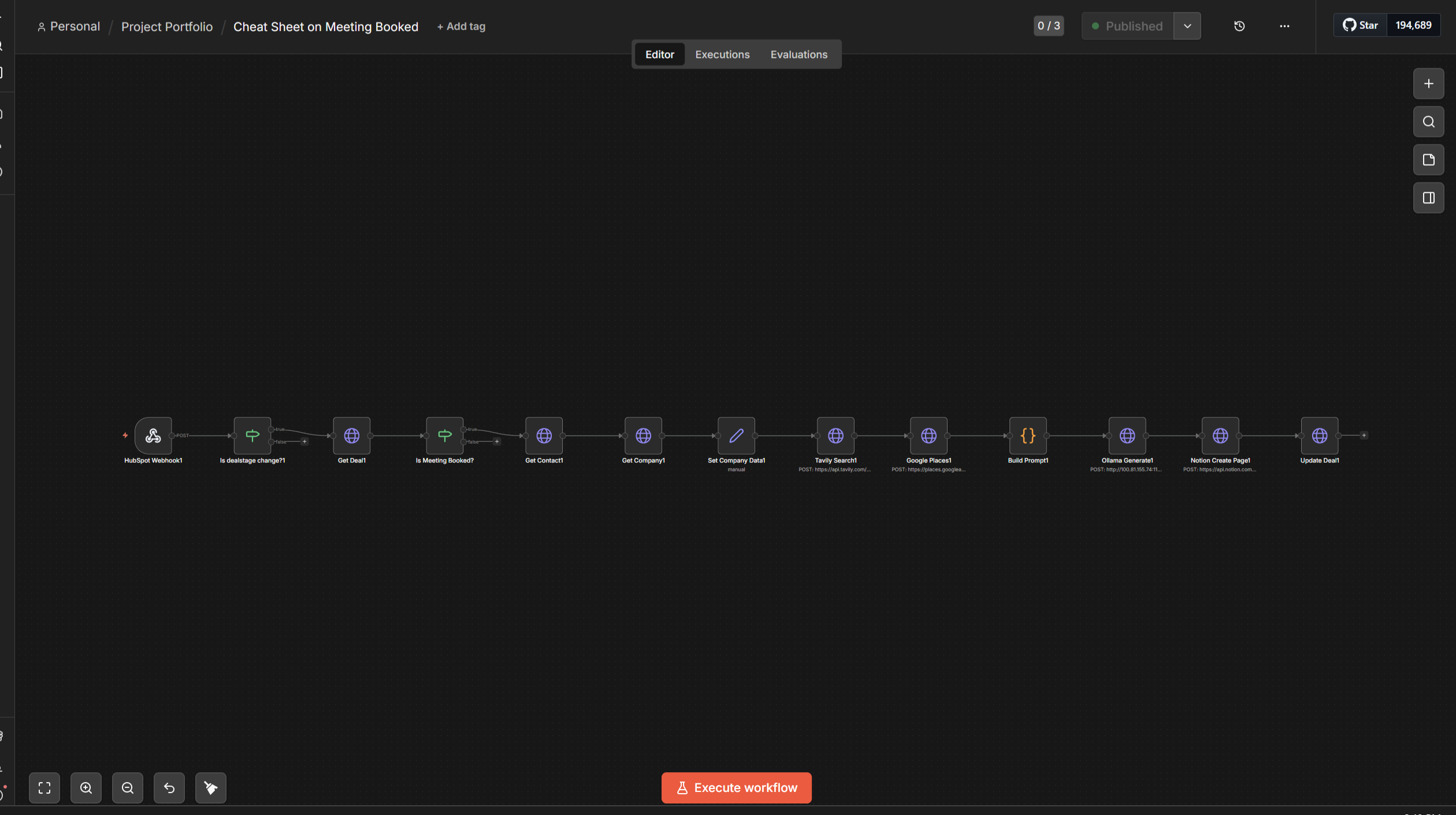
When a deal moves to Meeting Booked, a 12-step workflow fires: HubSpot data pull → Tavily web research → Google Places → local AI synthesis → Notion brief page created → link written back to HubSpot. The coordinator opens the call with a structured brief already waiting. Manual research time: zero.
5 · Lost deals come back
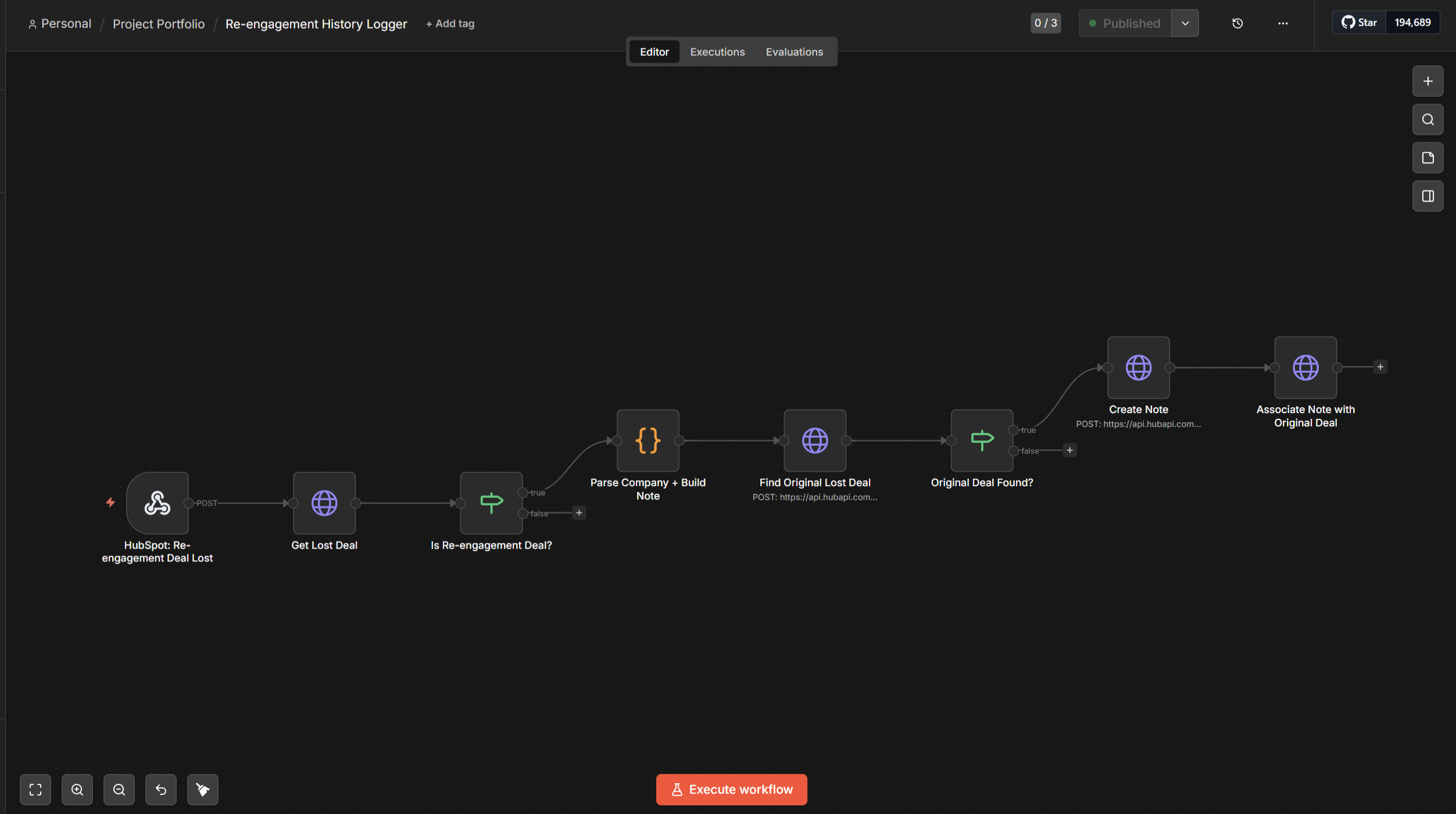
Daily, the re-engagement agent scans closed-lost deals. Budget and competitor losses wait 180 days; Not Now and No Response wait 90. For each one due, Tavily researches what has changed — leadership, funding, ESG announcements. A local AI returns a verdict: re-engage YES/NO + confidence + reason. The owner gets an email: Approve or Skip. On approval, a fresh deal is created at Prospect stage. The original stays Lost so win-rate analytics remain clean.
6 · One board, five areas
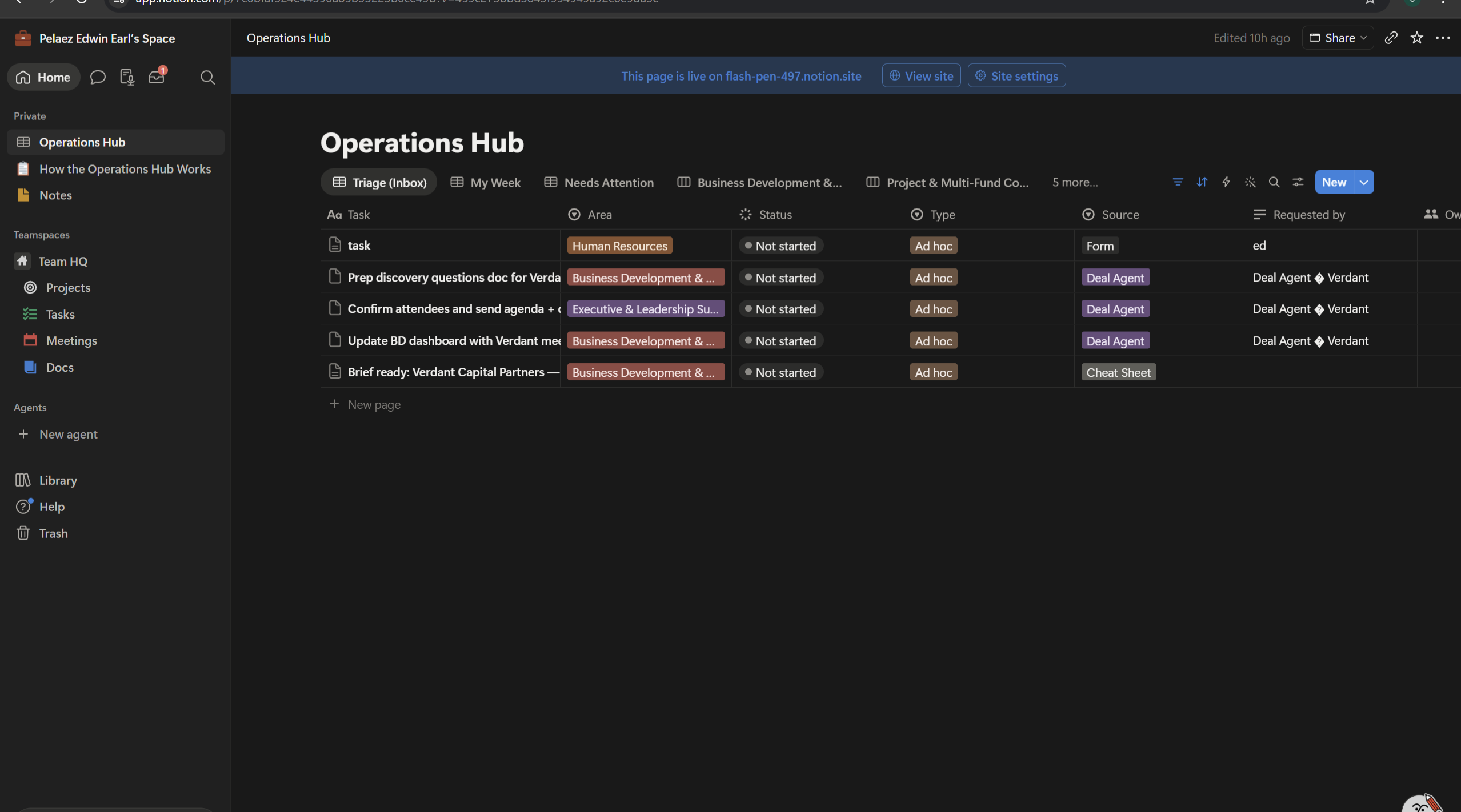
Everything lands in a single Notion database with five filtered views — one per functional area. The coordinator sees everything without switching tools. Leadership submits through the form and never needs board access.
Case Study
Problem
A global climate advisory firm's operations were scattered — requests arrived through email, Slack, and DMs; deal stage changes triggered nothing; pre-meeting research took 45 minutes per call; and closed-lost deals simply died with no systematic follow-up. The ops coordinator had no single system and no automation layer to rely on.
Solution
Seven n8n workflows that run the full ops cycle: an intake form routes all requests into a Notion task board (one database, five area views); HubSpot deal stage changes auto-spawn task playbooks; a nightly scan flags overdue and stale tasks with direct Notion comments; a meeting-booked trigger fires a 12-step research agent that writes a formatted brief before every call; and a daily lost-deal agent scans the CRM, researches what's changed, makes an AI judgment, and emails the deal owner for Approve/Skip before any re-engagement action is taken. Delivered with a coordinator SOP covering daily routine, view guide, priority logic, and manual fallback for every automation.
How It Works
Intake form → n8n webhook → Notion task created (Area, Type, Source, Requested By pre-filled, due date required). HubSpot webhook on deal.creation or dealstage change → n8n reads stage → stage-specific task playbook created in Notion with calculated due dates. Daily schedule → Notion query (all non-Done tasks) → deadline math buckets tasks into overdue/orange/yellow/stale → Notion Comments API posts rich-text alert tagging owner. On Meeting Booked: HubSpot → contact + company pull → Tavily research → Google Places → Ollama qwen3:8b brief synthesis → Notion page → HubSpot deal updated with link and Cheat Sheet Ready checkbox. Lost-deal agent: daily schedule → HubSpot search by loss reason + time window (90 or 180 days) → Tavily research per deal → Ollama verdict (YES/NO + confidence + reason) → Gmail approval email → on approve, fresh HubSpot deal created at Prospect; original deal stays Closed Lost.
Tools Used
Savings (Time & Cost) — Estimated
Time Saved
~30–45 min of meeting prep per call, eliminated
Monthly
≈15–25 hours per month across all 7 workflows (estimated)
Cost Savings
$600–$1,500/mo in coordinator time (estimated), plus any pipeline recovered from re-engaged lost deals
Conservative estimates based on the manual hours each workflow replaces, at $10–25/hr admin rates. Actual savings depend on your volume — figures marked "projected" come from builds validated end-to-end but not yet measured on live client data.
SERVICES
I deliver AI-first automation solutions that eliminate manual work and scale your operations.
Custom Workflows & AI Agents
Design and development of custom automation workflows and AI agents — from business process automation and AI-powered assistants to workflow orchestration, API integrations, and automated content workflows.
Business Process Automation
Streamline operations with Zapier, Make.com, and Go High Level — from lead capture to CRM sync to follow-ups.
AI-Powered Data Pipelines & Integrations
Connect disparate tools and build smart data flows that clean, transform, and route information automatically.
Intelligent Chatbots & Voice Agents
Deploy AI-powered chatbots and voice assistants that handle inquiries, qualify leads, and book appointments 24/7.
Workflow Optimization & Auditing
Audit existing processes, identify bottlenecks, and redesign workflows for maximum efficiency and cost savings.
AI-Assisted Web Development
Landing pages, portfolio sites, and web builds using AI-powered tools. From design to deployment — fast, clean, and production-ready.
Process Documentation & SOPs
Clear SOPs and training materials so your team can run automations confidently — no developer dependency required.
Social Media Automation
Automated content pipelines for LinkedIn, Facebook, and beyond — scheduled posts, AI-generated copy, and engagement workflows on autopilot.
ABOUT ME
I help businesses save time and cut costs by automating operations, training, and support with AI and no-code workflows.
After 3 years building training systems and SOPs at Drivers1st, I now apply that same systems-thinking to create reliable automations — from CRM integrations and lead routing to onboarding and internal workflows.
Tools I work with: n8n, Zapier, Make, OpenAI, CRMs, APIs, and chat automation.
Looking for practical automation that actually works? Let's connect.
WHY WORK WITH ME
Here's what you can expect when we collaborate.
End-to-End Automation
From workflow design to deployment — I handle the full pipeline so you don't have to touch a single manual step.
Measurable ROI
Every automation I build is designed to save time, cut costs, and deliver results you can track from day one.
Fast Turnaround
Most projects are scoped, built, and delivered within 1–2 weeks. Complex systems ship in under a month.
Ongoing Support
I don't disappear after launch. You get documentation and support to keep everything running smoothly.
SKILLS & TOOLS
Core Skills & Expertise
Tech Stack
Automation
AI & Models
CRM & Ops
Google Workspace
Dev & Infra
Comms & Voice
FAQ
Straight answers to the questions I get most.
What kind of automations do you build?+
Business process automations: lead intake and CRM pipelines, AI voice and chat assistants, follow-up sequences, document and quote generation, content scheduling, and internal ops workflows like task routing and stale-deal watchers. If your team does it by hand on a schedule, it can usually be automated.
Which tools do you work with?+
Mainly n8n, Zapier, Make.com, and GoHighLevel for workflows; HubSpot, Notion, Airtable, and Google Workspace on the data side; and AI models like Claude and GPT where language understanding is needed. I work with whatever stack you already have rather than forcing new tools on you.
Do I need AI in my automation?+
Not always — and I'll tell you when you don't. Many of my most reliable builds are deterministic: plain rules, schedules, and triggers with no AI in the loop. AI earns its place when the work involves judgment, language, or unstructured input. Using AI where a simple rule would do just adds cost and unpredictability.
What's the difference between Zapier, Make.com, and n8n?+
Zapier is the easiest to start with and has the most app integrations, but costs grow quickly with volume. Make.com is more visual and cheaper at scale. n8n is open source and self-hostable, which means the most control and the lowest running cost for complex or high-volume workflows — but it needs someone technical to set up. I pick based on your volume, budget, and who maintains it after me.
Can I hire you for a one-off automation, or only ongoing work?+
Both. Plenty of my work is a single, scoped build — one workflow, delivered, documented, done, with no ongoing commitment. Other clients start with one automation and grow into a retainer as more of the business gets automated. We figure out which fits your situation on the discovery call.
How much does an automation project cost?+
It depends on scope, which is why I start with a discovery call: we map the process, I tell you honestly whether automation is worth it, and you get a clear quote before any work starts. Simple single-workflow builds cost much less than multi-system pipelines with AI agents.
How long does a build take?+
Small workflows are usually live within days. Multi-workflow systems — like a full CRM pipeline with AI triage and follow-ups — typically take a few weeks including testing with your real data. You see working pieces early, not a big reveal at the end.
What happens after you deliver?+
You get documentation of how everything works and a walkthrough of the build. Automations include error alerts where it matters, so failures surface instead of silently piling up. I'm available for maintenance and changes as your processes evolve.
GET IN TOUCH
Book a discovery call or reach out directly.